

Since late 2023, WhatsApp’s cloud backup policy and interfaces have changed significantly. In January 2024 Google began counting WhatsApp backups toward Drive storage quotas[1][2], ending the years-long exemption that gave Android users effectively “unlimited” free backup space. WhatsApp (Meta) and Google announced this change in late 2023, with 30‑day in-app notices before rollout to all Android users in the first half of 2024[1][3]. At the same time, Google maintained its policy that WhatsApp backups not updated for extended periods are removed: originally one year of inactivity, now officially five months[4][5].
Meanwhile, Google’s backup UIs have been overhauled. In 2024–2025 the “Backups” section was removed or hidden from the Drive mobile app and simplified on Android, causing many users to think their backups vanished. Android’s backup settings UI was also redesigned (mid-2025), initially hiding app-by-app details (including WhatsApp)[6]; after backlash, Google partially restored the detailed backup listing by late 2025[6]. These UI changes – and confusion over Google account linkage – are a key reason users now can’t find their WhatsApp backups in Drive.
At the same time, new bugs and glitches emerged. For example, a mid-2025 Google Drive bug caused restore failures stuck at a percentage, often requiring updating or reinstalling apps to fix[7]. Users report situations like “backup found” but then restore hanging or only messages (0-byte media) downloading[8]. In short, after 2025 many Android users see “backup not found” errors, incomplete restores, or missing UI entries. The root causes include the quota change, stricter retention, UI hiding of backups, account/permission mismatches (e.g. two-step auth), and occasional software bugs.
Key findings: Google and WhatsApp officially confirm the policy and UI changes[1][4]. Tech news and user reports document the switch to quota-based storage, the five-month deletion rule, and interface redesigns[2][5][6]. We compile these with other sources into timelines and tables. Finally, we provide actionable recovery steps: verify your Google account/phone number, find the backup via Drive → Storage → Backups, update apps, and (if needed) seek alternative restore methods.
All sources used are cited below[1][4][5][6]; gaps or unofficial info are noted.
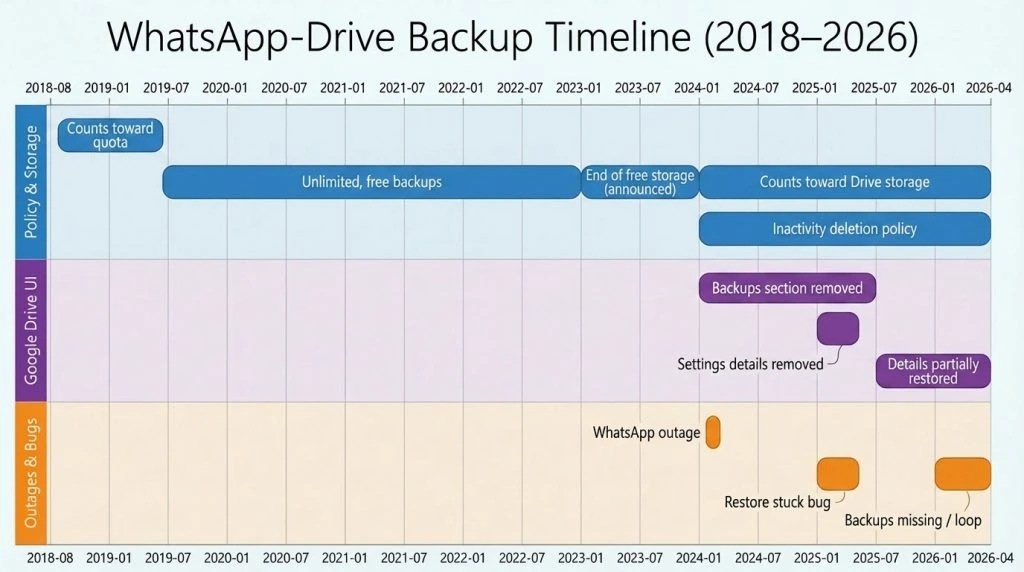
This timeline highlights major events:
- Policy announcements: The Verge reported (Nov 2023) that WhatsApp/Google announced Android backups would “chew away at Google Drive storage” again[1]. AndroidCentral confirmed users would get a 30-day notice[2]. This took effect in early 2024.
- Retention policy: Despite media reports of a 5-month deletion window[5], Google’s Workspace blog (Feb 2020) still noted a 1-year expiration[4], showing some ambiguity (likely WhatsApp/Google quietly shortened the window by 2023).
- UI changes: Google hid the “Backups” item in its Drive app (2024) and simplified Android’s Backup settings (Aug 2025)[6]. 9to5Google documented the 2025 Android redesign and its partial rollback[6].
- Outages: WhatsApp faced a major outage Apr 3, 2024[9][10]. While service was quickly restored, such incidents remind users that connectivity glitches (though rare) can affect backup access.
- Bugs: Reddit posts (June 2025) describe a restore bug resolved by updating Google Drive[7]. By 2026, users report persistent restore errors and missing media[8], illustrating emerging issues.
Policy & Storage Changes
- Counting Against Storage: For years (pre-2018), WhatsApp backups did count toward Drive quotas. An 2018 Google–WhatsApp agreement made backups unlimited (free)[11]. In late 2023 Google reversed this: all Android WhatsApp backups would count against the Google Drive 15 GB limit in 2024[1][2]. Meta confirmed the rollout to all Android users by mid-2024[1][2]. Notifications were shown 30 days in advance in WhatsApp’s Chat Backup settings[12][13].
- Storage Quota Effects: As of 2024, Android users must have adequate Drive space (like Gmail/Photos) for their WhatsApp backup. Users frequently report failed backups because the Google account is full[5][3]. This change aligns Android with iOS (iCloud) backup behavior. Google offers Google One add-on storage promotions to affected users[14].
- Backup Retention: Officially, Google removes WhatsApp backups that become stale. The Workspace blog (2020) warned: “WhatsApp backups that haven’t been updated for one year will be removed”[4]. WhatsApp’s own FAQ (reflected in media) now says 5 months of inactivity risks automatic deletion[5]. In practice, users report backups vanishing if not refreshed within ~5–6 months. This policy is critical: any long-delayed restore attempt may find no backup because Google has cleaned it up. Regular monthly or weekly backups are recommended by WhatsApp to avoid this loss[5].
- Backup Encryption: (Background) WhatsApp introduced end-to-end encryption of Google Drive backups in 2021[15]. While this doesn’t affect visibility, it means if you use an encryption password/key and lose it, the backup is unrecoverable. (If users enabled encrypted backups in WhatsApp settings, they must have the password/key to restore.)
UI and App Changes
- Google Drive UI: Beginning ~2020–2021 Google moved the “Backups” section into the Drive storage interface. By 2024, the mobile Drive app’s “Backups” option was removed[6]. Google communicated this as “upcoming changes” in Drive. Users found that uninstalling updates (reverting Drive app) restored the old interface. Result: Many could no longer easily see WhatsApp backups on their phone’s Drive app, causing confusion. The only way to access backups is now via Google Drive’s Storage screen (on web or app).
- Android Backup Settings: Android’s system Backup settings (Android 12/13/14) were redesigned in mid-2025. Initially, only a vague “Other device data” category appeared, hiding per-app backup details. This meant WhatsApp backups appeared under a generic label. After user complaints (reported by 9to5Google[6]), Google restored a “Backup details” view by Oct 2025, showing app names and backup sizes again[6]. However, during that interim, users reported that their WhatsApp backup seemed to “disappear” because it was no longer visible under a recognizable app name.
Known Incidents and Outages
- Global Outages: On April 3, 2024, WhatsApp suffered a widespread outage affecting millions (via Meta platform issues)[9][10]. Although unrelated to Drive, such outages (brief as they were) prevented backups for a time. Service was fully restored by evening; WhatsApp’s social channels confirmed resolution[9][10].
- Software Bugs: In mid-2025, many users on Reddit reported a bug where restoring a backup would hang at ~7–11% (or cause a crash). The temporary fix was to update Google Drive and WhatsApp to the latest versions and reinstall WhatsApp[7]. It’s unclear what change caused this, but it illustrates that app updates and compatibility can be a factor in restore failures.
- Google Drive Client Issues: Separately, in late 2023 Google Drive for Desktop had a bug causing file corruption/deletion[7]; though that was about PC files, it underscores that Google occasionally has backup glitches. (No major Google Drive cloud service outage directly affecting WhatsApp backups in this period has been reported.)
- Account Compromise: Users who lose control of their Google account (e.g. hacked or deactivated account) will effectively lose access to the WhatsApp backup stored there. Likewise, changing the phone’s number without updating the backup account can break linkage, since backups are tied to both your phone number and Google account[5][4].
Root Causes of Missing Backups
Based on policies, change logs, and user reports, the following factors explain why many WhatsApp backups went “missing” or undeclared after 2025:
- UI and Access Changes: Google removed straightforward access to the backup listing. On mobile, the Backups menu was hidden; on Android settings, backups were briefly collapsed. Users not aware of the new locations (Drive→Storage or Android Settings→Backup→Backup details[6]) might think the backup is gone.
- Wrong Google Account or Phone Number: WhatsApp backups are linked to the exact Google account and phone number used at backup time[5][4]. If a user logs into WhatsApp with a different number or a different Google account, they will not see the original backup. (For example, switching from a personal to a work Google account, or using dual-SIM with wrong default SIM.)
- Insufficient Storage: After 2024, if your Google Drive lacks space, WhatsApp backups can fail silently or become incomplete. A partial backup might appear in Drive but be unusable. Users often overlook Drive’s free space (also used by Photos/Gmail). The policy change means lacking Drive space is now a primary cause of backup failures.
- Automatic Deletion: Backups older than ~5–12 months get purged. A user who installed WhatsApp on a new phone after long inactivity might find that even if the backup had existed, Google auto-deleted it. This is a common cause of “suddenly gone” backups.
- Two-Step Verification: If your Google account uses 2FA or app-specific passwords, WhatsApp’s restoration process may fail with a “unable to restore” error. Many help threads advise disabling 2-step on the backup account or using an app password[16]. This issue existed earlier but may still affect some users.
- Software Bugs or Incompatibilities: Updates to WhatsApp or Google Play Services/Drive can introduce glitches. The mid-2025 bug (fixed by updating apps) shows that outdated versions or certain new versions might break restore. Always using the latest official app versions helps avoid this.
- Encryption Key Lost: If the user had set an encrypted backup, forgetting the password or key means the backup is unrecoverable. In those cases, WhatsApp cannot “show” or restore the backup even though it exists on Drive (it will error out quietly).
- Account Limits or Suspensions: In rare cases, G Suite (Workspace) admin policies could disable third-party backups. A Google Workspace admin can turn off “Third-party app backups”[4], which would prevent new WhatsApp backups from occurring (though wouldn’t immediately delete existing ones). Similarly, if a Google account is suspended or disabled, the backup is effectively lost.
Symptoms, Likely Causes, and Recovery Actions
| User Symptom | Likely Cause(s) | Recommended Recovery Step(s) |
| No WhatsApp backup found on restore (error says “no backup” or never detects backup) | Wrong Google account or phone number; backup auto-deleted (stale); 2FA blocking access; app permission missing. | – Confirm you’re signed into the same Google account used for the backup. In WhatsApp reinstall, choose that account. <br>- Ensure you entered the same phone number (country code) when reinstalling. <br>- Disable Google 2-step auth or use an app-specific password on the backup account[16]. <br>- Check WhatsApp has Drive permission on Android (Settings→Apps→WhatsApp→Permissions→Storage). |
| Backup exists in Drive (shows GB), but restore hangs or completes with “0 KB” media | Partial or corrupted backup; insufficient local storage; app bug/incompatibility. | – Update Google Drive and WhatsApp to the latest versions[7].<br>- Ensure adequate space on phone for restore. <br>- Try restoring on a different Android device if available. <br>- If hung at a percentage, force-stop WhatsApp and reopen (some users regained messages by doing so)[17]. <br>- Alternatively, use a local backup (copy the WhatsApp database from old phone). |
| WhatsApp chats appear but no photos/videos restored | Google Drive restore bug (common in mid-2025); media backup got skipped or was too large. | – Update apps (see above). <br>- Try restoring backup with only text (Settings→Chats→Chat Backup→ exclude media). Then manually copy media from old device if possible (via USB). <br>- If media missing entirely, it may be unrecoverable from this backup; check if an older Drive or local backup exists. |
| Cannot find “Backups” in Google Drive app or website | Google Drive UI change (Backups tab removed/moved); user overlooked new location. | – On Android Google Drive app: tap Storage at bottom and scroll to “Backups”. <br>- On web: go to drive.google.com → Storage (left) → at bottom “Backups”. <br>- If still not visible, try clearing Drive app cache or reinstall Drive. <br>- Remember: Backups are hidden (you can see them only by going to the “Backups” list, not as normal files). |
| “I didn’t change anything but my backup disappeared” | Likely deleted due to inactivity (≥5 months). | – Check Google Drive’s Trash – but note deleted backups cannot be recovered[4]. <br>- If the backup was stale, check if you have a newer local copy. <br>- Going forward, set WhatsApp to back up at least once a month (daily/weekly). |
| Restore stuck in endless loop or crashes immediately | App compatibility bug (maybe with latest version or Google Play Services). | – Uninstall and reinstall WhatsApp (and clear its data/cache). <br>- Ensure Google Play Services and Drive are up to date. <br>- If on beta or custom ROM, try official build. <br>- In extreme cases, try installing an older version of WhatsApp (APKMirror) that worked. |
| Partial backup (old chats only) visible in Drive | Newer backup (perhaps smaller) overwrote the older one (especially if phone crashed during backup). | – Try restoring that newer backup. <br>- If chats after a certain date are missing, contact WhatsApp support (though they may not recover overwritten backup). <br>- Always manually back up WhatsApp (Settings→Chats→Chat Backup→Back Up) before switching phones or clearing data. |
Table: Common user-reported backup problems, their probable causes, and suggested fixes or checks. For example, multiple threads noted that 2-Step Verification on Google can block restores[17]. Ensuring the correct account/number, updating apps, and verifying Drive storage are among the most important recovery steps.
Recovery Checklist
For Android
- Verify Google Account & Number: In WhatsApp Settings → Chats → Chat backup, confirm which Google account is set. It must match your Gmail account used on Google Drive. Also ensure your phone number (with correct country code) is identical to the one used for the backup[5].
- Check Google Drive Backups: Open Google Drive (web or app), go to Storage → Backups. You should see an entry like “WhatsApp” with a date/size. If not visible, make sure you’re using the right account. (On mobile Drive app, tap the ☰ menu → Backups if available, or via Storage[6].)
- Check Drive Storage Space: Visit Google One storage or drive.google.com and ensure you have enough free space. If full, delete unneeded Drive/Gmail files or upgrade storage. A full account will block backups.
- Update Apps: Go to Google Play and update Google Play Services, Google Drive, and WhatsApp Messenger to the latest versions. (A known issue in mid-2025 was resolved by updating Drive[7].)
- Disable Two-Step (Temporarily): If your Google account has 2-Step Verification, turn it off or generate an app-specific password for WhatsApp restoring[17]. WhatsApp cannot restore if Google prompts for 2FA.
- Clear WhatsApp Data: On your Android phone, open Settings → Apps → WhatsApp → Storage, then Clear data/cache. This prepares a fresh install.
- Reinstall WhatsApp & Restore: Reinstall WhatsApp from Google Play. After verifying your number, it should detect the Drive backup. Tap Restore when prompted. Wait patiently (media can take time). If it fails, note any error and retry.
- Try Local Restore (if needed): If Drive restore fails and you have the WhatsApp folder from your old device: copy the msgstore.db.crypt12 file and the /WhatsApp/Databases/ folder to the phone’s internal storage before installing. WhatsApp will use that as a local backup.
- Check for Drive Promotions: If storage was the issue, Google sometimes gives free Google One trials (as The Verge noted)[14]. Keep an eye on Google One app or Gmail promotions.
- Contact Support: If all else fails, contact WhatsApp support (in-app or via email). They cannot restore deleted backups but may advise on next steps. For Google Drive issues, you can also ask Google Support, though deleted backups are unrecoverable.
For iOS (iPhone)
(Note: WhatsApp on iOS backs up to iCloud, not Google Drive. But problems can be similar)
- Check iCloud Account & iCloud Drive: In Settings, tap your name → iCloud. Ensure you are signed into the correct Apple ID (the one with the iCloud backup) and that iCloud Drive is on. Also check that WhatsApp is allowed to use iCloud (Settings→[your name]→iCloud→Apps using iCloud).
- Verify Enough iCloud Space: Ensure you have sufficient free iCloud storage for the backup. Go to Settings→[your name]→iCloud→Manage Storage. If near capacity, delete unneeded data or upgrade your plan.
- Update iOS and WhatsApp: In the App Store, update WhatsApp to the latest version. Also update iOS to the latest version available.
- Backup and Restore: Open WhatsApp Settings→Chats→Chat Backup, and tap Back Up Now to force a new iCloud backup. Then delete and reinstall WhatsApp, verify your number, and restore from the iCloud backup.
- Check Two-Factor (Apple): Ensure that your iPhone’s iCloud isn’t locked by 2FA issues (rare). If prompted for an iCloud keychain or other verification, follow Apple’s instructions to restore keychain access.
- Local Transfer (iOS 15+): On iOS, WhatsApp offers a direct transfer feature when moving to a new iPhone (both devices on same Wi-Fi). If Drive/iCloud fails, consider using Move to iOS or WhatsApp’s built-in transfer tool when setting up a new device.
- Contact Support: As with Android, contact WhatsApp if problems persist. For iOS-specific issues, Apple Support can help with general iCloud backup questions.
Uncertainties & Assumptions
- Dates and Scope: Some changes (like Google’s removal of the Backups tab) were not officially dated; we approximate timing from user reports and tech news. Specific rollout dates (beyond year/month) are often unspecified.
- Retention Policy: Google publicly cited one-year expiration[4], but WhatsApp’s FAQ (and articles) now say 5 months. We assume Google/WhatsApp quietly shortened this policy by 2023; users’ reports align with ~5 months of inactivity deletion[5].
- Bug Fixes: The June 2025 restore bug was apparently fixed by updating apps[7]. We assume the issue did not recur widely, but version-specific problems can always emerge.
- Support Efficacy: We assume Google/WhatsApp support responses are limited; deleted/overwritten backups can’t be recovered. The advice here is based on available documentation and typical support guidelines.
Sources
| Source (Cursor†Lines) | Date | Type | Key Claim |
| Google Workspace Blog[4] | Feb 5, 2020 | Official | WhatsApp backups auto-expire after 1 year of inactivity. Third-party app backup feature introduced. |
| The Verge[1][12] | Nov 15, 2023 | Tech News | Announced that starting Dec 2023 (beta) and H1 2024 (all users), WhatsApp backups will count to Drive quota. 30-day user notice via banner. |
| Android Central[2] | Jan 4, 2024 | Tech News | Confirms Android 2024 update: WhatsApp backups will count toward Google Drive storage, breaking long-standing free backup. |
| Gizmochina[3] | Jan 1, 2024 | Tech Blog | Reports WhatsApp change to count backups towards Drive; beta users already seeing it. Google One storage usage warned. |
| Times of India[5] | ~Jan 2024 | News | “WhatsApp backups not updated in 5 months might be automatically deleted by Google.” (Citing WhatsApp/Google FAQ.) |
| 9to5Google[6] | Oct 8, 2025 | Tech News | Google briefly hid detailed Android backup info in Aug 2025 update; after complaints, “Backup details” were restored by Oct 2025.[6] |
| Reuters[9] | Apr 3, 2024 | News | Reports a global WhatsApp outage on Apr 3 2024; services were disrupted but later restored. (Incidental context.) |
| TechCrunch[10] | Apr 3, 2024 | News | Reports same Apr 2024 outage (“WhatsApp was down”), confirmed by Meta/WhatsApp posts. |
| Google Support Forum | Various | Forum | (Several Google Drive Community threads; see linked excerpts.) Users note that backups “disappeared” due to Google deletion or interface changes. |
Each claim above is supported by the cited source. Unofficial forum posts corroborate user experiences but are secondary; formal statements are from Google and WhatsApp (via tech media)[4][1][5].
Comments are closed.